Sales teams, managers, and customer support representatives often spend valuable time switching between applications, following up on approvals, and searching for important business updates. Salesforce and Slack integration helps solve these challenges by connecting CRM data with real-time team communication. In this blog, we explore how businesses can use both platforms together to automate workflows, improve collaboration, and create a connected business journey.
Understanding Salesforce and Slack
Salesforce is a leading Customer Relationship Management (CRM) platform that helps organizations manage customer information, leads, accounts, opportunities, and service cases. It also provides automation capabilities through Salesforce Flow, Apex, and other platform services.
Slack is a business communication and collaboration platform that enables teams to communicate through channels, direct messages, threads, huddles, and shared workspaces.
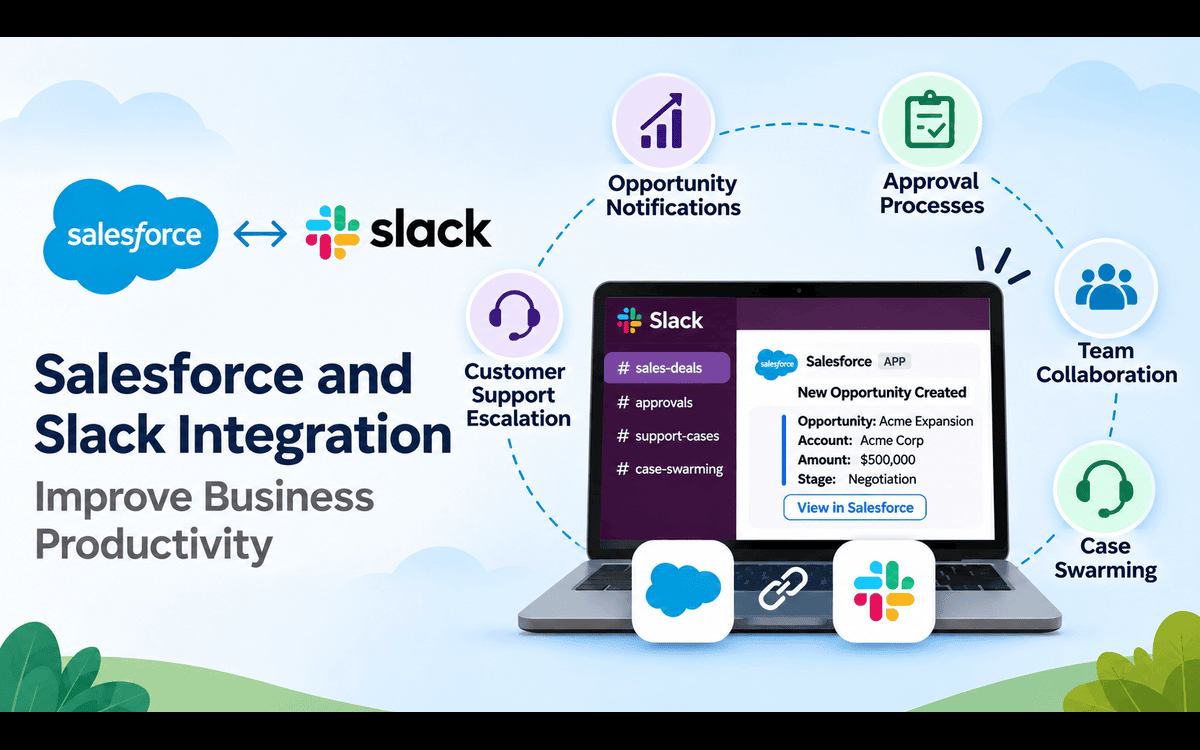
When integrated, Salesforce and Slack connect business processes with team communication. Instead of manually checking Salesforce for updates or sending emails to different departments, employees can receive relevant notifications and collaborate directly through Slack.
How Salesforce and Slack Work Together
Let's understand this integration through a real-world business scenario that connects the sales process with customer support.
1. Opportunity Creation and Real-Time Notifications
Imagine a sales representative working with a potential customer interested in purchasing a company's products or services.
The representative creates an Opportunity in Salesforce and enters important details such as Opportunity Name, Account Name, Amount, Stage, Close Date, and Opportunity Owner.
Now, imagine that the opportunity meets predefined business conditions, such as:
- Opportunity Amount is greater than or equal to ₹10,00,000.
- Opportunity Stage reaches Negotiation or Review.
- Opportunity Probability reaches 70% or above.
Salesforce can identify these opportunities through automation and send an automatic notification to the relevant Slack channel.
The Slack notification can include:
- Opportunity Name
- Account Name
- Opportunity Amount
- Current Stage
- Opportunity Owner
- Expected Close Date
- A button to view the opportunity in Salesforce
This ensures that sales managers and team members are immediately informed about important business opportunities without constantly monitoring Salesforce.
2. Managing Opportunity Approvals Through Slack
Creating an opportunity is only one part of the sales process. Sometimes, closing a deal requires special pricing, discounts, or management approval.
Consider a situation where a sales representative offers a special discount to a customer. Before proceeding, the opportunity must go through an approval process.
Salesforce Approval Processes can manage this requirement. When the opportunity is submitted for approval, the designated manager receives a notification through Slack. The notification can provide relevant opportunity details and a link to access the Salesforce record.
The manager can review the request, discuss it with the sales representative, and take the appropriate approval action using the configured Salesforce approval workflow.
This approach improves approval visibility, reduces unnecessary email communication, and helps managers respond more efficiently.
3. Creating Dedicated Slack Channels for Collaboration
For important opportunities, businesses can create dedicated Slack channels to bring relevant employees together.
For example, when a high-value opportunity is created, Salesforce automation can initiate the creation of a dedicated Slack channel for that deal. The channel can include the sales representative, sales manager, finance team, and other relevant stakeholders.
Within these channels, employees can:
- Discuss opportunity strategies.
- Share important documents.
- Exchange updates through message threads.
- Coordinate sales activities.
- Discuss customer requirements.
- Track important decisions.
Slack Canvas can also help teams maintain shared notes, plans, and important information. This creates a centralized collaboration space where everyone involved in the opportunity can stay informed.
4. Customer Support Escalation Through Slack
The business journey does not end when an opportunity is successfully closed. Maintaining customer satisfaction and providing effective support are equally important.
Imagine that the customer purchases a product or service but later experiences a critical issue. The customer support representative creates a Case in Salesforce and assigns the appropriate priority.
If the Case Priority is marked as High or Critical, Salesforce can automatically trigger a Slack notification to the relevant support team.
The notification can contain:
- Case Number
- Customer or Account Name
- Case Subject
- Case Priority
- Case Owner
- Case Description
- A link to open the Case in Salesforce
This helps the support team identify urgent issues quickly and take action without constantly monitoring Salesforce.
5. Case Swarming: Bringing Experts Together
Some customer issues cannot be resolved by a single support representative. They may require assistance from developers, technical experts, product specialists, or senior support managers.
This is where Case Swarming becomes useful. Instead of transferring a Case between multiple departments and waiting for individual responses, relevant team members can collaborate through a dedicated Slack conversation.
They can share technical information, discuss possible solutions, ask questions, and work together to resolve the issue.
For example, if a customer reports a technical issue, the support representative can involve a developer and a product specialist in the same discussion. This approach reduces communication gaps, encourages teamwork, and helps organizations resolve customer issues more efficiently.
Important Slack Features That Strengthen Collaboration
Apart from notifications and automated workflows, Slack provides several features that improve team productivity.
| Feature | How it helps businesses |
|---|---|
| Channels | Organize conversations around projects, customers, and opportunities. |
| Threads | Keep discussions organized by responding to specific messages. |
| Huddles | Enable quick audio and video discussions between team members. |
| Slack Canvas | Maintain shared notes, plans, and important information. |
| Slack Connect | Collaborate with external organizations and business partners. |
| Slack AI | Help users find information and summarize conversations using available AI capabilities. |
| Workflow Builder | Automate repetitive tasks and streamline everyday workflows. |
Together, these capabilities make Slack more than just a messaging application. It becomes a collaborative workspace that supports everyday business operations.
Business Benefits of Salesforce and Slack Integration
Integrating Salesforce with Slack provides several important advantages.
1. Improved Productivity
Employees spend less time switching between applications and searching for information. Important updates are delivered directly to the relevant Slack channels.
2. Faster Decision-Making
Real-time notifications help managers and employees respond to important business events, approval requests, and customer issues more quickly.
3. Better Team Collaboration
Dedicated Slack channels bring relevant stakeholders together to discuss opportunities, share updates, and resolve challenges.
4. Reduced Manual Effort
Automated notifications and workflows reduce repetitive communication, manual follow-ups, and unnecessary administrative work.
5. Improved Customer Experience
Faster coordination between support teams helps organizations address critical customer issues and deliver better service experiences.
6. Greater Business Visibility
Teams can stay informed about important sales activities, approvals, and customer support operations without constantly checking Salesforce.
Salesforce and Slack: Working Together
The following table summarizes how both platforms contribute to different business processes.
| Business Process | Salesforce Responsibility | Slack Responsibility |
|---|---|---|
| Opportunity Management | Stores and manages opportunity records. | Notifies sales teams and supports deal discussions. |
| Approval Management | Handles approval rules and approval status. | Delivers approval notifications and enables collaboration. |
| Team Collaboration | Maintains business records and related information. | Provides channels, threads, and shared workspaces. |
| Case Management | Manages customer cases and their priorities. | Notifies support teams and enables Case Swarming. |
| Workflow Automation | Triggers automated business processes. | Delivers notifications and supports collaborative workflows. |
Conclusion
Salesforce and Slack together create a connected business ecosystem that brings customer data and team communication closer.
From creating a sales opportunity and managing its approval to collaborating with colleagues and resolving critical customer cases, this integration supports the entire business journey.
Rather than treating CRM and communication as separate activities, organizations can connect both platforms to create smarter workflows, improve decision-making, and strengthen collaboration.
The real value of Salesforce and Slack is not simply connecting two applications; it is connecting people, processes, and business information to help organizations work better together.
Frequently Asked Questions
1. What is Salesforce and Slack integration?
Salesforce and Slack integration connects Salesforce CRM data with Slack's collaboration capabilities. It allows teams to receive CRM notifications, collaborate on business records, and access relevant information through Slack.
2. Can Salesforce automatically send notifications to Slack?
Yes. Salesforce can send automatic notifications to Slack using Salesforce Flow, Apex, Slack APIs, and supported Salesforce integration capabilities.
3. Can we create Slack channels automatically from Salesforce?
Yes. With the appropriate Slack API integration and permissions, Salesforce can automate Slack channel creation based on business conditions, such as creating a channel for a high-value opportunity or critical customer case.
4. How does Slack help with Salesforce approval processes?
Slack can deliver notifications when Salesforce records are submitted for approval. Managers can review the relevant information, collaborate with employees, and use configured approval actions to manage requests.
5. What is Case Swarming in Salesforce and Slack?
Case Swarming is a collaborative approach where multiple team members with different expertise work together to resolve a customer issue. Slack provides a shared communication space for discussing the Case and coordinating solutions.
6. Does Salesforce and Slack integration require coding?
Not always. Basic integrations and notifications can be configured using available Salesforce and Slack automation capabilities. More advanced requirements, such as dynamic channel creation, custom notifications, and user mapping, may require Apex and Slack APIs.
7. What are the major benefits of integrating Salesforce with Slack?
The major benefits include real-time notifications, faster approvals, improved collaboration, reduced manual communication, better visibility into business activities, and faster customer support.