Car buyers today start their research on WhatsApp. They message a dealership late at night, compare a few models, ask for a price and expect an answer straight away. For many automotive businesses, those conversations are spread across several WhatsApp numbers, handled manually, and never make it into the CRM.
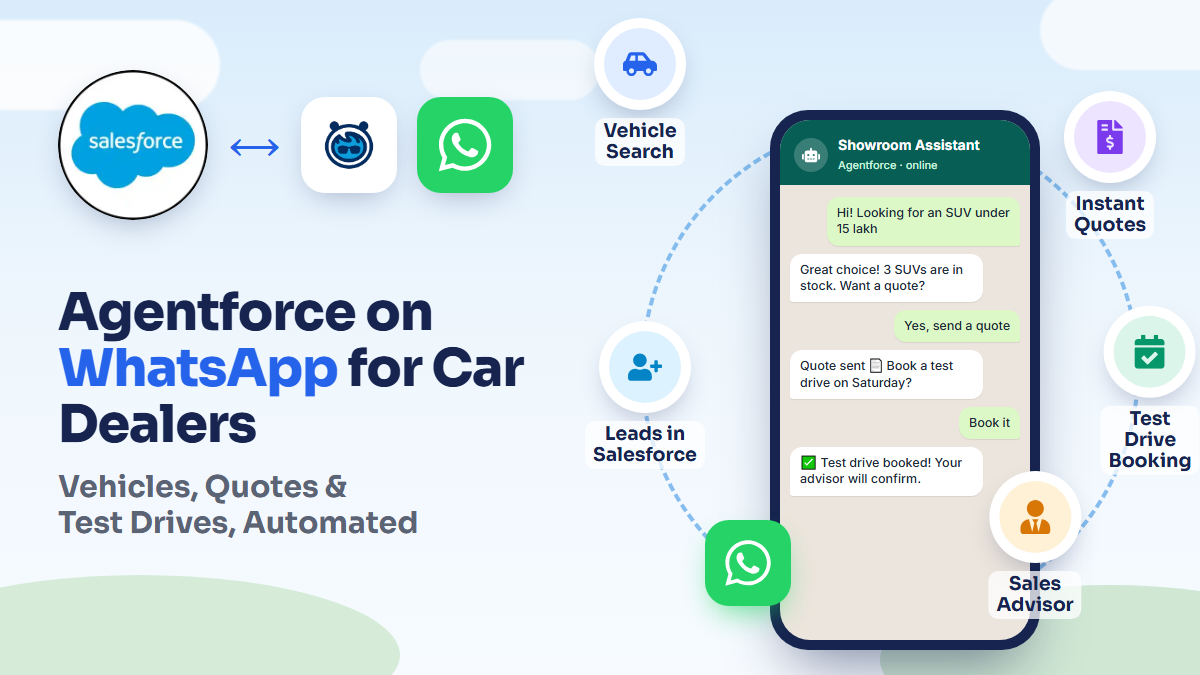
In this post, we walk through how we helped an automotive agency solve this with an Agentforce Service Agent on WhatsApp: one AI agent that answers buyers instantly, shows available vehicles, shares quotes, books test drives and hands over to a sales advisor, while Salesforce is updated automatically at every step.
The challenge: busy WhatsApp numbers, lost leads
The agency was receiving a high volume of vehicle enquiries, but the process behind them didn't scale:
- Enquiries were spread across multiple WhatsApp numbers, one per dealership or campaign.
- Replies were manual, so responses were slow, especially outside showroom hours.
- Many WhatsApp enquiries never reached Salesforce as leads, so they couldn't be followed up or measured.
- Test drives were scheduled by phone and chat, with no single view of bookings.
- There was no way to tell which number or campaign produced sales.
- Sales advisors picked up conversations without context, so customers had to repeat themselves.
The solution: one Agentforce agent for every WhatsApp number
We implemented an Agentforce Service Agent using Salesforce Messaging for WhatsApp and connected all of the agency's WhatsApp numbers to it. Because the agent runs inside Salesforce, it works directly with the agency's real data.
We built custom topics and actions for the agent, using Apex and Flow, so it can do more than chat. It can look up live inventory, create quotes, check availability and update records. We also configured Omni-Channel routing for handoffs to people, and applied guardrails through the Einstein Trust Layer to keep replies accurate and on-brand.
The buyer journey, step by step
1. The customer messages any WhatsApp number
Whichever dealership or campaign number the customer messages, the conversation reaches the same Agentforce agent. The agent recognises returning customers by their phone number.
2. The agent shows available vehicles
The agent searches live inventory in Salesforce and suggests models, variants, colours, fuel types and prices that match the customer's budget and preferences.
3. The customer picks a vehicle and asks for a quote
The agent generates a quote and sends it on WhatsApp. An Opportunity and Quote are created in Salesforce automatically.
4. The agent books a test drive
The agent checks showroom and advisor availability, books a slot and confirms it on WhatsApp. The appointment and calendar event are created in Salesforce for the assigned advisor.
5. The customer can talk to a sales advisor at any time
When the customer asks for a person, the agent hands the conversation over through Omni-Channel. The advisor sees the full chat history and the vehicle the customer is interested in.
6. Reminders and follow-ups
Automated reminders go out before the test drive, and advisors receive follow-up tasks to close the deal.
What happens in Salesforce
Every step of the conversation is reflected in Salesforce without manual data entry:
| Salesforce record | What's captured |
|---|---|
| Leads | New or updated leads, with the lead source set to the WhatsApp number the customer used |
| Contacts & Accounts | Returning customers matched by phone, so all history sits on one record |
| Opportunities & Quotes | The vehicle, variant and quoted price |
| Appointments & Events | Test drive bookings on the advisor's calendar |
| Messaging Sessions | The full WhatsApp conversation |
| Tasks | Follow-ups and owner assignment when an advisor takes over |
The results for the business
- Every enquiry gets a reply at any time of day, not just during showroom hours.
- Every WhatsApp conversation is captured as a lead in Salesforce.
- Buyers get quotes and book test drives themselves in a few messages.
- Sales advisors receive warm, fully informed handoffs.
- Lead sources are tracked per WhatsApp number and campaign, so marketing spend can be measured.
- The team no longer has to enter leads, appointments and events by hand.
Read the full automotive Agentforce case study for more detail on the project.
Is an Agentforce WhatsApp agent right for your business?
This approach works well for any business where customers ask similar questions before buying and the next step is a booking or a quote. Examples include car dealers, real estate developers, clinics, education providers and service companies. If your team spends hours answering the same WhatsApp questions, or leads are slipping through the cracks, an AI agent connected to Salesforce can help.
Explore our Agentforce services to see what else we build with Agentforce.
Frequently Asked Questions
Can one Agentforce agent handle multiple WhatsApp numbers?
Yes. With Salesforce Messaging for WhatsApp, several business numbers can be connected to the same Agentforce Service Agent. Each conversation can still be tagged with the number it came from, which is useful for lead source and campaign tracking.
Does the agent update Salesforce automatically?
Yes. Agent actions built with Apex and Flow create and update records such as leads, opportunities, quotes, appointments and tasks during the conversation, so no manual data entry is needed.
What happens when a customer wants to talk to a person?
The agent hands the conversation over to a sales advisor through Omni-Channel routing. The advisor sees the full conversation history and context, so the customer doesn't have to repeat anything.
Is it safe to let an AI agent talk to customers?
Agentforce uses the Einstein Trust Layer, together with guardrails defined in the agent's topics and instructions, to keep responses grounded in your Salesforce data and within the boundaries you set.